Business Process Automation (RPA) with Microsoft Power Automate
30–70% less time on routine operations
Service prices
The price depends on the complexity of the process, the number of integrations and the scope of automation.
Trusted by leading companies




































How we work with clients
Terms you see before we start — not discover along the way.
Scope, price and timelines are fixed on paper. No fine print.
Your Google Ads account stays your property, with the full campaign history.
You pay for our work. Your ad budget goes straight to Google — it never passes through us.
Google Partner status and current Google Ads certifications across the team.
You see what was done, what was spent and how many leads it brought. Reporting frequency is up to you.
A review of your ads and website before we start, plus a 10,000 UAH ad bonus.
Processes we automate
RPA lets you automate both simple and complex business processes without changing your IT infrastructure.


How we measure automation efficiency
Power Automate, CRM/ERP integrations, AI Builder, automated scenarios and execution monitoring
We model the current process and identify bottlenecks.
We calculate the time and cost savings before launch.
We track scenario execution and errors.
We optimize and expand automation.
We help businesses get rid of routine through automation
Request a consultation
We implement RPA solutions on Microsoft Power Automate to optimize internal processes.
By clicking the button, you agree to the privacy policy
We will get back to you within 30 minutes.
Our services
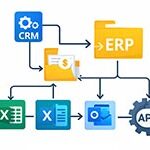
We integrate CRM, ERP, accounting systems, Excel, Outlook, APIs and the company’s internal services.
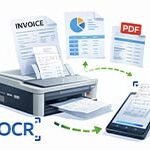
Processing invoices, acts, PDFs, OCR.
Payment reconciliation, report generation, 1C integration.
CRM, ERP, Excel, Outlook, API.
Creating tasks, sending notifications, checking statuses.
Robot execution control and scaling.
What you get from automation
- Business process analysis and documentation
- A calculation of potential savings before implementation
- A clear technical automation plan
- Support and scaling after launch


By clicking the button, you agree to the privacy policy
We will get back to you within 30 minutes.
Our team

How a project runs
From the first request to well-managed ads — no black box. Ads go live within 2 days.
We get to know your business: what you sell, to whom, your goals and current numbers.
We study the niche, the auction, your landing pages and what was done before us.
We agree on campaign structure, keywords and a starting budget for your niche.
Google Analytics and Tag Manager, goals and events across the funnel — so we count leads, not clicks.
Ads, bids, audiences, negative keywords. Up to 2 days from getting access to the first impressions.
We cut what doesn’t pay off and scale what works. You get a report with conclusions.
RPA questions and answers
And how working with us goes — from audit to results review.
RPA is a technology for automating business processes with software robots that perform routine tasks instead of employees: processing data, moving information between systems, generating reports and handling documents.
With Power Automate you can automate document flow, request processing, CRM and ERP integration, financial reporting, payment reconciliation, order status checks and other repetitive operations.
It depends on the complexity of the process. Basic automation scenarios are implemented within 1–3 weeks; complex solutions can take 1–2 months.
In most cases, no. Software robots integrate with your existing CRM, ERP and accounting systems without a full rebuild of your IT infrastructure.
Automation cuts the time spent on routine operations by 30–70%, reduces errors and makes internal processes more transparent.
Yes. Automation works well for companies with repetitive operations, a high volume of documents or a need to integrate several systems.
Business Process Automation (RPA) with Microsoft Power Automate
Business process automation isn’t about a “trendy technology” – it’s about control and economics. If your company performs repetitive operations every day – moving data between systems, creating invoices, checking statuses, processing requests or reporting – it can be automated.
RPA (Robotic Process Automation) lets you create software robots that perform routine tasks faster and without errors. We implement solutions on Microsoft Power Automate, integrating them with CRM, ERP, accounting systems, Excel, Outlook and the company’s internal services.
Which processes can be automated
Automation suits most operational tasks that follow clear logic and repeat regularly. Most often these are:
- processing incoming requests and distributing leads
- integration between CRM and accounting
- automatic generation of invoices and acts
- payment reconciliation and payment control
- processing PDF documents with OCR
- regular report generation
- task execution control and notifications to responsible people
RPA doesn’t change your IT infrastructure – it works on top of existing systems, combining them into a single logical process.
Why businesses implement RPA
The main reason is saving time and reducing operating costs. When employees spend hours manually moving data or checking spreadsheets, the company pays for work an algorithm could do.
After implementing automation you get:
- 30–70% less time spent on routine operations
- fewer human errors
- transparent processes
- faster document turnaround
- the ability to scale without adding staff
Business process automation is especially relevant for companies that handle a large volume of documents or are scaling actively.
How implementation works
We don’t “just build a robot” – we build the logic of the process.
- We analyse the existing process
- We identify where time is lost
- We describe the automation scenario
- We develop the solution in Power Automate
- We test and launch
- We connect monitoring and support
Before we start, you get a clear understanding of the economic effect and the technical implementation plan.
Microsoft Power Automate for business
Power Automate is part of the Microsoft ecosystem that lets you create both cloud and desktop automation scenarios. The platform supports integration with hundreds of services and enterprise systems, making it a universal tool for digital transformation.
It suits small, medium and enterprise businesses where security, scalability and flexibility matter.
Who process automation is for
RPA will be effective if:
- you have repetitive operations
- some processes are run in Excel
- you use several different systems
- data needs to be synchronized between departments
- the business plans to grow
Automation is a step towards structured and predictable management.